Evaluating the 50 Doodle Hand Drawn Brushes Pack for Illustrator
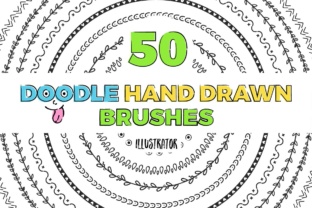
For digital artists and graphic designers, the choice of tools often dictates the efficiency and aesthetic quality of the final output. Among the vast array of resources available for Adobe Illustrator, the 50 Doodle Hand Drawn Brushes pack stands out as a specific utility designed to replicate organic, sketch-like textures within a vector environment. This collection is not merely a set of static images but a functional toolkit comprising 50 pattern brushes engineered to be adjustable in size, color, and weight. Understanding the scope, compatibility, and practical application of this pack is essential for designers deciding whether it aligns with their current workflow and project requirements.
Understanding the Core Functionality
At its heart, the 50 Doodle Hand Drawn Brushes collection serves to bridge the gap between the precision of vector graphics and the imperfection of traditional hand sketching. Vector art is inherently clean and mathematical, which can sometimes result in designs that feel sterile or overly rigid. These brushes introduce controlled randomness and texture, allowing users to create lines that mimic ink, pencil, or marker strokes. The pack includes two distinct components tailored to different software versions: DoodlesCS1, optimized for the older Illustrator CS1 architecture, and Handsketch doodles, built for the modern Illustrator CC ecosystem. This dual-inclusion ensures that the utility of the brushes extends across a wide timeline of software iterations, accommodating both legacy users and those on the latest creative cloud subscriptions.
The technical foundation of these assets lies in their format as pattern brushes. Unlike scatter brushes, which distribute objects along a path, pattern brushes stretch a defined pattern along the length of a stroke. This characteristic is crucial for maintaining consistent line weights and textures, especially when drawing continuous shapes or borders. The ability to adjust size, color, and weight directly within the Illustrator interface means that designers do not need to return to the source file to make minor tweaks, significantly speeding up the iteration process.
Reasons for Interest and Potential Applications
Designers typically seek out resources like the 50 Doodle Hand Drawn Brushes when they need to inject personality into corporate or commercial projects without sacrificing the scalability of vector files. Common use cases include branding materials that require a friendly, approachable tone, such as packaging for artisanal food products, logos for creative agencies, or illustrations for educational content. The "hand-drawn" aesthetic suggests authenticity and human touch, qualities that are increasingly valued in a digital-first marketplace.
Furthermore, these brushes are particularly useful for creating custom dividers, frames, and decorative elements in layout design. Because the brushes are vector-based, the resulting artwork remains resolution-independent. This makes them a strong fit for projects that require scaling from small business cards to large-format billboards. Users who frequently switch between detailed iconography and broader illustrative work may find the versatility of having 50 distinct styles invaluable for maintaining visual variety within a single project.
Benefits and Practical Advantages
The primary benefit of this pack is the time saved in creating custom brushes from scratch. Developing a high-quality pattern brush that tiles seamlessly and reacts correctly to corner points can be a time-consuming technical task. By providing a pre-made library, the 50 Doodle Hand Drawn Brushes allow designers to focus on composition and concept rather than tool creation. The inclusion of both CS1 and CC versions eliminates compatibility friction, ensuring that teams working in mixed software environments can share files without losing brush data.
Another significant advantage is the editability. Since the brushes respond to standard stroke settings, a designer can quickly test different visual directions by simply altering the stroke weight or applying a global color change. This flexibility supports rapid prototyping, where multiple variations of a design element need to be presented to a client or stakeholder quickly. The organic nature of the doodles also helps in breaking up grid-based layouts, adding a dynamic flow to otherwise static pages.
Tradeoffs and Considerations
While the 50 Doodle Hand Drawn Brushes offer considerable utility, there are tradeoffs to consider. The "doodle" aesthetic is specific; it may not suit projects requiring ultra-minimalism, high-tech futurism, or strict geometric precision. Overusing hand-drawn elements can sometimes clutter a design, making it appear unprofessional if not balanced with adequate white space and structured typography. Designers must evaluate whether the playful nature of these brushes aligns with the brand voice they are trying to convey.
Additionally, while pattern brushes are powerful, they can sometimes behave unpredictably at sharp angles or complex joins depending on the specific settings of the Illustrator version being used. Users working with the CS1 version may find fewer customization options compared to the CC version, as newer iterations of Illustrator have introduced advanced brush controls like width profiles and variable width strokes that interact differently with pattern brushes. It is important to test the brushes in the specific context of the intended project to ensure the endpoints and corners render cleanly.
When to Choose Alternatives
There are scenarios where alternatives to the 50 Doodle Hand Drawn Brushes may be more appropriate. If a project demands photorealistic textures or complex shading that mimics traditional painting media, raster-based brushes in software like Photoshop or Procreate might yield better results. Vector doodle brushes are excellent for line work but lack the depth and blending capabilities of pixel-based tools. Similarly, if a design requires a highly unique, signature style that cannot be achieved through pre-set patterns, investing time in drawing custom vectors or commissioning a bespoke brush set might be a better long-term strategy.
Designers working exclusively on web interfaces where load time and code cleanliness are paramount might also prefer SVG icons or CSS-based solutions over embedded brush strokes, which can sometimes increase file complexity. In these instances, the aesthetic goal should be weighed against technical performance constraints.
Making the Decision
Ultimately, determining whether the 50 Doodle Hand Drawn Brushes are the right fit depends on the specific needs of the designer and the nature of their projects. For professionals who regularly produce branding assets, editorial illustrations, or marketing materials that benefit from a human-centric aesthetic, this pack offers a robust and efficient solution. The dual compatibility ensures longevity, while the adjustable parameters provide the necessary control for professional refinement.
However, for those whose work leans heavily towards technical illustration, UI/UX design, or styles that demand absolute geometric purity, the value proposition diminishes. Evaluating the current portfolio and identifying gaps in textural variety can help clarify the decision. If the goal is to streamline the workflow while expanding the visual vocabulary with organic elements, integrating these brushes represents a logical and practical enhancement to the Illustrator toolkit. As with any design resource, the true value is realized not just in the download, but in how effectively it is integrated into a cohesive creative process.