Inchiostro Illustrator Brush Pack: Hand-Drawn Vector Art
There is a persistent myth in the design community that vector art lacks soul. Many talented illustrators avoid Adobe Illustrator entirely, believing that the medium forces work to look too clean, sterile, and digital. They crave the unpredictability of ink on paper, the texture of a rough nib, and the organic flow of a hand-drawn line. On the other side of the spectrum are the purists who love the precision of the Pen Tool and standard geometric shapes but secretly wish their crisp lines carried a bit more human warmth. If you fall into either camp, the Inchiostro Illustrator Brush Pack offers a bridge between technical precision and artistic expression.
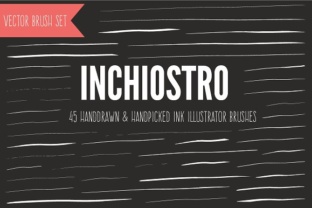
This collection was not generated by an algorithm or created from scratch within the software. Instead, it began with real ink strokes on physical paper. Each stroke was carefully scanned, traced, and converted into high-fidelity Illustrator art brushes. The result is a toolset that allows you to maintain the infinite scalability and editability of vectors while achieving the authentic look of traditional media. With 45 unique brushes included in a single .ai file, this pack provides the texture and variation needed to break free from the "digital look" without sacrificing the workflow advantages of vector graphics.
Bridging the Gap Between Digital and Traditional
The greatest advantage of using the Inchiostro set is the ability to modify your art endlessly while retaining a hand-crafted aesthetic. When you draw with a physical pen, a mistake often means starting over or working around the error. In Illustrator, applying these brushes to your paths means you can tweak anchor points, adjust curve handles, and refine compositions long after the initial stroke has been laid down. You can apply different brushes to the same path to see how the mood changes, or simply alter the stroke width to shift the emphasis of a line instantly.
This flexibility is particularly valuable for professionals who need to iterate quickly. Imagine creating a logo concept that requires the rugged feel of a stamp or a sketch. With standard tools, achieving this often involves importing raster images, which lose quality when scaled. With Inchiostro, you retain full vector control. You can scale the artwork for a business card or a billboard without any loss in resolution, ensuring that the ink texture remains sharp and defined at any size.
A Touch of Italian Character
Details matter in creative work, and even the naming convention of this brush pack reflects a commitment to character. To add a layer of fun and personality, each of the 45 brushes has been given a unique Italian name. This isn't just a gimmick; it helps users mentally categorize the strokes based on their behavior and feel. Whether you are looking for a fine liner suitable for intricate hatching or a broad nib for bold, expressive statements, the names serve as intuitive guides to the brush's personality.
When you open the library, you aren't just selecting a tool; you are choosing a specific type of mark-making instrument. This approach encourages experimentation. Designers often find themselves sticking to one or two favorite brushes, but having a curated list with distinct identities invites you to test variations you might otherwise overlook. It turns the technical process of selecting a brush into a more creative decision about the tone of your artwork.
Practical Applications for Diverse Creators
The versatility of the Inchiostro Illustrator Brush Pack makes it suitable for a wide range of projects beyond simple illustration. Here is how different creators can adapt these tools for their specific goals:
- Brand Identity Designers: Use the textured strokes to create logos that feel established and artisanal. The imperfect edges of the brushes can soften a corporate identity, making a brand feel more approachable and human-centric.
- Editorial Illustrators: For magazines and blogs, these brushes allow for rapid creation of spot illustrations that match the tone of handwritten notes or classic engravings. The ability to edit paths ensures that the illustration fits perfectly within tight layout constraints.
- Packaging Artists: Create label designs that stand out on shelves. The ink textures provide a premium, handcrafted look that suggests quality and attention to detail, essential for products like craft beverages, organic foods, or boutique cosmetics.
- Social Media Managers: Generate engaging visual content quickly. The brushes allow for the creation of custom typography and decorative elements that feel personal and less like generic stock templates, helping posts gain higher engagement.
- Educators and Presenters: Enhance slides and educational materials with diagrams that look sketched by hand. This style often feels more accessible and less intimidating to audiences than rigid, computer-generated charts.
Maintaining Consistency and Clarity
While texture adds depth, it can also introduce visual noise if not managed correctly. When working with a rich set of brushes like Inchiostro, it is crucial to maintain clarity in your final output. A common pitfall is overusing varied stroke weights, which can make a design look cluttered. To keep results effective and organized, consider establishing a limited palette of brushes for each project. Perhaps select one brush for outlines, another for shading, and a third for accents. Sticking to a consistent set ensures your work feels cohesive rather than chaotic.
Furthermore, pay attention to the scale of your strokes relative to the canvas. Because these are art brushes, they stretch along the path. If a path is too short, the texture might distort; if it is too long, the pattern might repeat visibly. Always preview your strokes at 100% zoom to ensure the ink texture looks natural. Adjusting the stroke profile or using the Width Tool can help taper ends naturally, mimicking the pressure sensitivity of a real pen.
Getting Started with Your Library
Integrating these tools into your workflow is straightforward, ensuring you can start creating immediately without wrestling with complex installation procedures. Once you have downloaded the package, follow these steps to unlock the potential of the pack:
- Unzip the Inchiostro Brush Pack folder to access the .ai library file.
- Open Adobe Illustrator and navigate to Window > Brush Libraries > Other Library....
- Locate the Inchiostro file on your drive and select it. The brush panel will appear as a floating window.
- To make the library persistent so it loads automatically in future sessions, click the menu icon in the top corner of the brush panel and select "Persistent." This saves time and keeps your favorite tools always within reach.
Once installed, the workflow becomes intuitive. Draw a path with the Pencil or Pen Tool, then simply click on a brush from the Inchiostro panel to apply it. The transformation is instant. You can then dive deeper by double-clicking the brush icon to adjust fidelity, overlap, and spacing, tailoring the stroke to your specific artistic needs.
Ultimately, the goal of any creative tool is to disappear into the workflow, allowing your ideas to take center stage. The Inchiostro Illustrator Brush Pack achieves this by removing the barrier between the digital interface and the organic feel of traditional drawing. Whether you are a skeptic of vector art or a devotee of the Pen Tool, this collection offers a practical way to inject warmth, texture, and humanity into your digital creations. By combining the best of both worlds, you can produce work that is not only technically sound but also emotionally resonant.