Why Arlin Might Be the Hand-Brushed Font Your Project Needs (And How to Use It Right)
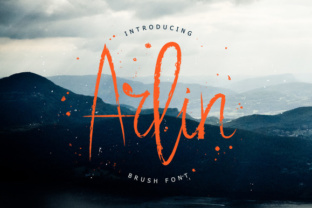
There is a specific kind of energy that only a hand-brushed typeface can bring to a design. It feels human, immediate, and slightly imperfect in all the right ways. Arlin captures this essence perfectly with its distinctive thin lines and fluid strokes. Unlike many script fonts that try too hard to look like calligraphy, Arlin maintains a modern, airy feel that works surprisingly well across various mediums. However, the very features that make this font attractive—its delicate weight and organic movement—can also lead to significant usability issues if you aren't careful about how you apply it.
Many designers, marketers, and small business owners rush to download and install trendy fonts without considering the practical implications of their choices. You might fall in love with the aesthetic of Arlin on a large desktop monitor, only to realize later that it vanishes on a mobile screen or looks muddy when printed on textured paper. The goal isn't to discourage you from using beautiful typography, but to ensure you avoid the common pitfalls that turn a great design choice into a frustrating failure.
The Trap of Delicate Weight in Digital Environments
The defining characteristic of Arlin is its thin line weight. This gives it an elegant, sophisticated look that stands out against bold, heavy sans-serifs. However, this elegance comes with a cost: legibility. A frequent mistake creators make is using ultra-thin fonts like Arlin for body text or small captions, especially in digital formats.
When viewed on high-resolution retina displays, thin lines can look crisp and stunning. But the moment that design is viewed on a lower-resolution Android device, an older laptop, or a compressed social media image, those thin lines often disappear entirely or break up into pixelated artifacts. This doesn't just look unprofessional; it actively prevents your audience from reading your message.
To avoid this, reserve Arlin for headlines, pull quotes, or large display text where the point size is substantial enough to maintain the integrity of the strokes. If you must use it at smaller sizes, ensure there is maximum contrast between the text color and the background. Never place thin white text over a busy or light-colored background. Instead, pair it with a solid, dark background to make those delicate lines pop. For body copy, switch to a sturdy sans-serif or a serif font with a higher x-height to ensure readability remains high.
Misunderstanding Context and Brand Voice
Another area where people stumble is mismatching the font's personality with the brand's voice. Because Arlin feels handwritten and personal, there is a temptation to use it for anything that requires a "human touch." While this is often correct, it can backfire if the context demands authority or urgency.
For instance, using a wispy, hand-brushed font for a financial warning, a legal disclaimer, or a high-stakes call to action can inadvertently signal that the message isn't serious. Consumers subconsciously associate thick, blocky fonts with stability and thin, flowing scripts with creativity and leisure. If you are an entrepreneur launching a fintech app, using Arlin for your primary logo might make your platform feel less secure than intended.
The better approach is to use Arlin as an accent rather than the workhorse of your brand identity. Let it shine in areas where you want to evoke emotion, such as a testimonial section, a "thank you" note on a packaging insert, or a seasonal promotion banner. By limiting its use to specific emotional beats, you preserve its impact without undermining your overall credibility.
Technical Oversights in File Formats and Licensing
Beyond design theory, there are practical technical errors that can derail a project involving Arlin. One common oversight is ignoring the file format requirements for different platforms. Web fonts behave differently than desktop fonts. If you simply upload a standard OTF or TTF file to your website without optimizing it for web delivery, you may experience slow load times or rendering glitches where the font fails to appear until the page fully loads (known as FOUT - Flash of Unstyled Text).
Furthermore, licensing is a critical detail that freelancers and agencies sometimes overlook in the rush to meet a deadline. Just because you downloaded Arlin for a personal mockup doesn't mean you have the rights to use it in a commercial client project. Many font foundries offer separate licenses for desktop use, web embedding, and app integration. Using a font beyond its licensed scope can lead to legal headaches and unexpected costs down the road.
Before finalizing any design, always check the specific license agreement. If you are building a website, consider using a web-font service or converting the font to WOFF2 format to ensure performance. If you are sending files to a printer, always outline the text or embed the fonts correctly to prevent substitution errors that could ruin the thin strokes of Arlin.
Poor Pairing Choices That Dilute Impact
Typography is rarely a solo act; it is about harmony. A significant mistake users make with hand-brushed fonts is pairing them with other decorative or complex fonts. When you pair Arlin with another script or a highly stylized display font, the result is visual chaos. The eye doesn't know where to rest, and the unique character of Arlin gets lost in the noise.
The most effective pairings for Arlin involve contrast. Since Arlin is organic and irregular, it pairs beautifully with geometric, clean, and neutral sans-serif fonts. Think of fonts like Montserrat, Lato, or even a classic Helvetica. These provide a stable grid that allows the fluidity of Arlin to dance on top without the whole composition feeling unstable.
- Do: Use Arlin for the headline and a clean sans-serif for the subhead and body text.
- Do: Ensure ample whitespace around Arlin to let the thin lines breathe.
- Don't: Stretch or distort the font to fit a specific space; this ruins the natural stroke variation.
- Don't: Use all-caps with Arlin if the letterforms become indistinguishable from one another.
Making the Final Decision
Choosing a font is more than picking something that looks nice in a preview window; it is a strategic decision that affects how your message is received. Arlin offers a wonderful blend of modernity and humanity, but it demands respect for its limitations. By understanding where its thin lines thrive and where they struggle, you can make informed decisions that elevate your work rather than compromise it.
Before you commit to using Arlin in your next campaign, logo, or blog post, test it rigorously. Print it out at the actual size it will be used. View it on three different devices. Check the licensing terms one last time. These small steps ensure that when you do use this beautiful typeface, it performs exactly as you envisioned, delivering a polished and professional result that resonates with your audience.