Wedding Overlays: Elevate Your Photo Aesthetics
Doesn't the perfect day deserve the perfect pictures? For many, capturing a wedding is about more than just freezing a moment in time; it is about curating an emotion. This is where Wedding Overlays come into play. These digital assets act as a finishing touch, allowing photographers and designers to infuse images with specific moods, textures, and vintage charm without needing complex reshoots or expensive equipment. Whether you are looking to spruce up wedding photography for a client, design thank-you note cards, or build a cohesive portfolio, these tools offer a bridge between raw capture and artistic vision.
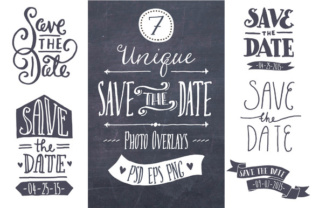
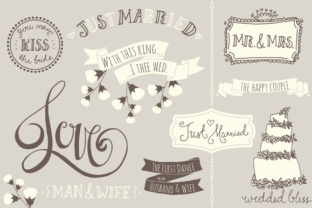
At their core, wedding overlays are semi-transparent graphical elements placed over a photograph. Think of them as digital filters with depth. The specific set described here features hand-drawn, vintage-style designs, including sepia tones that evoke nostalgia. Unlike standard filters that apply a uniform color shift, these overlays often include intricate details like film grain, light leaks, or decorative borders. The technical flexibility is significant: users can simply place a PNG image over their photograph and adjust the transparency to their taste. For those seeking deeper control, layered PSD files allow for color customization, while vector versions ensure scalability without quality loss.
Why Different Creatives Care About Digital Finishing
The value of Wedding Overlays shifts dramatically depending on who is holding the mouse. What matters to a hobbyist snapping photos of a friend's ceremony differs vastly from the priorities of a seasoned studio owner. Understanding these perspectives helps in selecting the right tools and workflows.
For beginners and hobbyists, the primary draw is ease of use and immediate visual impact. They may not have mastered advanced color grading in Lightroom or Photoshop. Overlays provide a shortcut to professional-looking results. By dragging and dropping a pre-made element, they can instantly transform a flat digital image into something that feels organic and timeless. The inclusion of Photoshop brushes in many overlay sets further lowers the barrier to entry, allowing novices to "stamp" effects onto images without worrying about masking or blending modes initially.
Professional photographers, however, evaluate these tools through a lens of efficiency and brand consistency. A pro shooting multiple weddings a month needs a workflow that is fast but reliable. They look for high-resolution files (like the 300dpi standards mentioned in quality sets) that hold up under large prints. For them, the ability to customize colors via layered PSDs is crucial. They aren't just applying a filter; they are matching the overlay to the specific lighting conditions of the venue or the color palette of the bride's dress. The fact that the text in some templates is completely hand-drawn means no fonts are used, which adds a unique, non-generic feel that clients appreciate, even if it means the text itself isn't editable.
Practical Applications Across Industries
Beyond the photographer, various creators find unique utility in these assets. The versatility of having formats like AI, EPS, and PNG allows the same asset to serve different masters.
- Graphic Designers and Stationers: When creating thank-you note cards or save-the-dates, designers need elements that integrate seamlessly with typography. Vector files (AI and EPS) are indispensable here. They allow the designer to scale a decorative corner piece or a central frame to fit any card size without pixelation. The organized, labeled layers save hours of cleanup time.
- Small Business Owners and Marketers: A wedding planner or venue owner building a portfolio website needs imagery that sells a dream. Using consistent overlays across a gallery creates a cohesive brand identity. It signals attention to detail and a specific aesthetic style—perhaps "rustic vintage" or "romantic sepia"—which helps attract the right demographic of couples.
- Educators and Mentors: Those teaching photography or digital art can use these sets to demonstrate blending modes, layer masking, and the history of photographic textures. It provides a safe sandbox for students to experiment with composition before moving on to creating their own assets from scratch.
Evaluating Quality and Flexibility
When deciding if a specific set of Wedding Overlays matches your goals, consider the format and the level of control offered. A basic user might prioritize the "drag-and-drop" nature of PNGs. A set containing 20 overlays in multiple sizes and stamp versions offers variety, ensuring you don't use the same look on every photo. The availability of three color variations—all cream, all brown, and a mixture—allows for subtle adjustments to match skin tones or background hues.
Conversely, a power user will scrutinize the vector capabilities. Fully editable vector files organized in a single AI or EPS file represent long-term usefulness. You can isolate a specific swirl or texture and repurpose it for a logo, a watermark, or a social media graphic years down the line. This transforms the purchase from a one-time photo fix into a permanent addition to your creative toolkit.
It is also important to note limitations to manage expectations. As mentioned in product details for hand-drawn sets, if the text is part of the artwork rather than a font layer, it is not editable. For a user needing to insert specific names or dates directly into the overlay graphic, this requires a workaround, such as placing the overlay as a background element and typing over it with a matching font. Recognizing this distinction early prevents frustration during the editing process.
Making the Right Choice for Your Project
Ultimately, the decision to use wedding overlays comes down to the story you want the image to tell. If the goal is a crisp, hyper-realistic documentation of events, heavy vintage overlays might distract. However, if the objective is to evoke memory, warmth, and a sense of history, these tools are unmatched.
For the entrepreneur, the calculation includes commercial value. Can these assets help win more bids? Does the polished look justify a higher price point for photography packages? For the consumer creating a personal album, the value is emotional preservation. For the freelancer, it is about speed—delivering high-quality edits faster means taking on more projects.
Whether you are utilizing the stamp versions for quick embellishments or diving into the layered PSDs for granular color correction, the end result is a photograph that feels intentional. In a digital age where thousands of images are captured daily, adding that layer of curated texture ensures your work stands out, resonating with viewers on a deeper, more sentimental level.