Hand Drawn Feathers Set: Whimsical Design Elements
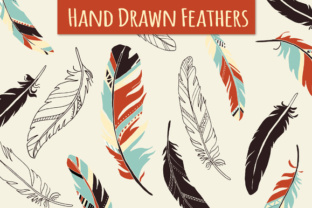
There is a specific kind of magic that happens when you introduce organic, hand-crafted elements into a digital layout. In a world saturated with perfect geometric shapes and sterile vector lines, something drawn by human hand carries a weight and personality that algorithms simply cannot replicate. The Hand Drawn Feathers Set taps directly into this need for authenticity. It isn't just a collection of clipart; it is a toolkit for adding texture, movement, and a touch of whimsy to projects that feel too rigid. Whether you are building a brand identity for a boutique wellness studio or designing an invitation for an intimate gathering, these elements offer a blowing-in-the-wind quality that instantly softens the visual tone.
The appeal of this set lies in its versatility and the sheer variety of formats included. You aren't limited to a single static image. Instead, you get a comprehensive library where each of the six core feather designs is presented in multiple iterations: plain versions, decorated variations, stark silhouettes, and delicate outlines. This depth allows you to use the same motif in different contexts without repetition feeling obvious. For instance, you might use a detailed, decorated feather as a focal point on a packaging label, while employing the simple silhouette version as a subtle watermark on the interior pages of a brochure. The inclusion of custom-colored sets in red, green, aubergine, and cream means you can drop these assets straight into a project and have them look cohesive immediately. However, the real power comes from their customizability. Because they are fully editable, you can match the colors to any preferred palette, ensuring they reinforce your specific brand identity rather than clashing with it.
Integrating Organic Textures into Modern Branding
When we talk about modern typography and design assets, the conversation often revolves around clean sans serif fonts or bold display fonts. While those are essential for readability and structure, they often lack emotional resonance on their own. This is where illustrative elements step in. Using the Hand Drawn Feathers Set alongside a crisp serif font or a flowing script font creates a dynamic visual hierarchy. The feathers act as anchors or accents that guide the eye, breaking up blocks of text and adding breathing room to a layout.
Consider the impact on logo design. A logo composed entirely of type can feel corporate and distant. By integrating one of the decorated feather illustrations, perhaps wrapping it around the initial letter or using it as a underline element, you instantly communicate values of freedom, lightness, and creativity. This approach works exceptionally well for industries like yoga, natural skincare, travel agencies, and artisanal food producers. In packaging design, these elements can be used to create patterns or borders that suggest a handmade, small-batch quality. Consumers today are savvy; they can spot mass-produced genericism from a mile away. Hand-drawn details signal care and attention, which translates to perceived value.
Furthermore, these assets are not restricted to print. In web design and social media graphics, loading times and scalability are critical. Having access to EPS vectors ensures that your feathers look sharp on a 4k monitor or a mobile screen alike. You can animate these elements subtly—perhaps having them drift across a hero section—to increase user engagement without overwhelming the interface. The psychological effect is subtle but potent; organic shapes make digital spaces feel more welcoming and less mechanical.
Technical Flexibility for Every Workflow
For the working designer, the file format is often just as important as the aesthetic. A beautiful illustration is useless if it doesn't fit into your workflow. The Hand Drawn Feathers Set addresses this by providing a robust mix of raster and vector files. You receive 48 PNG files, which are perfect for quick drag-and-drop usage in applications like Canva, PowerPoint, or social media schedulers. These come in various colorways, including black and white for high-contrast needs.
However, the true professional utility shines in the vector files. The set includes 2 AI (CS1) files and 2 EPS files. These are fully editable, organized, and layered, labeled specifically for ease of use. If you are working in Adobe Illustrator or Photoshop, you can open these files and manipulate individual strokes, change weights, or recolor specific segments of the decoration without losing resolution. This level of control is vital for editorial design where space is at a premium, or for commercial font pairings where precise alignment is necessary. The ability to edit the vector paths means you can even modify the shape of the feather slightly to better fit a specific composition, making it a truly custom typeface companion.
Additionally, the inclusion of Photoshop brushes (ABR format) streamlines the texturing process. Instead of placing a static image, you can "paint" with the feathers. This is particularly useful for creating backgrounds, borders, or scattered motifs that feel random and natural rather than grid-like. The set comes with installation instructions, ensuring that even those less familiar with brush management in Photoshop Elements can get started quickly. This combination of stamps, vectors, and ready-to-use PNGs makes the set a versatile addition to any creative professional's bag of tricks.
Practical Strategies for Implementation
Choosing the right decorative element requires more than just picking what looks pretty; it requires evaluating project fit. Before dropping a feather into your layout, ask yourself what role it plays. Is it there to decorate, or is it functional? In effective font pairing, every element should serve a purpose. If you are using a heavy, bold display font for a headline, a delicate outline feather might get lost. Conversely, a thick, filled silhouette might overpower a light handwritten font. Test your combinations at actual size. What looks balanced on a large monitor might disappear on a business card.
Readability remains king. While these feathers add character, they should never compromise the legibility of your core message. Use them in margins, as background textures with reduced opacity, or as framing devices. Avoid placing complex decorated feathers directly over body text unless you are certain the contrast is sufficient. In terms of consistency, pick one or two styles from the set and stick with them throughout a project. Mixing the plain silhouette with the highly decorated version in the same immediate vicinity can sometimes look cluttered unless done with intentional contrast in mind.
Finally, consider the licensing and commercial potential. Assets like these are designed to be workhorses for small business owners and entrepreneurs. Whether you are designing a line of greeting cards, creating digital planners for sale, or branding a new coffee shop, ensure you understand the usage rights. High-quality design assets like the Hand Drawn Feathers Set save hours of illustration time, allowing you to focus on strategy and content. By leveraging these pre-made yet customizable elements, you maintain a high standard of professionalism while infusing your work with that elusive, human touch that connects with audiences on a deeper level.